Rappelz Bot Download
http://rapidshare.com/files/200962754/JT_s_Rappelz_Bot_V12.4.zip.html
-Auto fights monsters near your character
**NOTE: The bot uses the TAB button to target and has a limited range due to this.
-Turns the camera view **V12.4 and older
**NOTE: The bot changes from the Rappelz window to the Bot window to accomplish this.
**V12.5 and newer - Camera turning removed - now moves West and East (maintaining a rectangular field) to find more mobs when it is unable to target anything it can attack.
-Monitors both the Player and Pet#1 health and will heal each when below a set HP% set by a slider control. The targeted healer function only works outside of battle. Pet or Player can be set as main healer for this.
-capable of using self-healing spells on player during battle. Pet self-healing during battle is only possible with a pet with a self healing spell... IE, Yeti
-Auto-Buffs player and pet with a complete array of options like cast time and recast timers. Capable of using self buffs and targeted buffs casted by the Player, Pet, and even pet only buffs that are breeder casted.
-Can use a pulling attack
-Can use chips before attacking. Chips can also be reused during battle and have an adjustable recast timer.
-Pet and Player casted attack skills can be used during battle with fully adjustable cast delays and recast timers.
-Will not attack known bot-traps (known means it is in the bot-trap tab) and a backup attempts a new target if you do not cause damage after a set delay.
What do all of the nubers mean?
|3000| cast delay in miliseconds
The four digit number is always the ammount of time it takes to cast a spell in miliseconds... 1000ms = 1sec. If you make this number too short, the bot will interupt your cast with its next command. If you make this number too large... it will add un-needed delay to the bot and it will stay paused after it has casted for what ever length of extra time you gave it. Keep in mind... the pulling or force ship initial pull options need extra delay so your character has timer to run in range and use the pulling function. Another useful tip is that you can assign your pet only attack to ALT+F8 and set the delay to 5000-6000 and your pet will always attack first, then you will join in. Force chip initial pull needs to be set to at least 3000-4000. This fixes the out of range issues and gives your character time to run in range to use the force chips.
|30| recast timer in minutes OR seconds
The two digit number is always in minutes OR seconds... Easy enough to be said like so, IF it is a BUFF... it is in minutes... everything else is in seconds. This is simply the recast timer. It will not reuse that skill until the timer is up. You can either use this for a cooldown timer, or you cna use this for a recast timer for your buffs.
Vista users... UAC is not your friend... UAC = User Account Control. This is a very cool and neat part of vista that prevents potentially malicious software from accessing and changing stuff on your PC without your permission. With this enabled, the bot will not be able to inject commands to Rappelz unless the bot is run with administrator privilages. This means you will either have to rightclick on the bot and run as adminitrator every time you run it... or you will have to disable UAC in Control Panel / User Accounts / Turn User Account Control on or off. I have left detailed instructions on page 96.
Windows XP users... I have come to the conclusion that my bot works way better on Vista than it does on windows XP, This is due to Windows XP wanting to BLAST through the script at lightning speeds. I will have to add additional delay on an OS toggle or something to repair the bot. If you are using Windows XP and a particular function does not work on my bot please post so I know. I know the bot does not work correctly on my Windows XP machine.
I am very open minded about modifications and bug reports. If you see something you do not think is supposed to happen or if you know of a way of doing a function that might be better than what I already have, then please post it. If you do have an idea, please do all you can to fully explain it. I am kind of new to Rappelz, so I do not know a whole lot about how differnt skills work in the game.
Please do not ask me to post my code or source. I have no problem explaining how certain functions inside my program work; however, it is my program I spent months of time writing. I do not want clones floating arround stealing my hard earned credit.
V12
- First release i removed the word BETA from... and for a good reason.
- Check the buttons the bot uses really close... yes I changed some.
- Wow... just plain wow... it took me a long time to write this version
V12.1
- repaired the breeder casted buffs... was using F12 for both instead of F11 and F12
- Added 8 new german bot-traps.
V12.2
- repaired the 8 new German bot-traps, I made a big oops.
- Added 4 new English bot-traps
V12.3
- yes... it works
V12.4
- Added the windows XP delay back into the bot, on the Battle & Misc tab last option. The value can be a 4 digit number, but I only recommend between 10 and 250 on the delay as it is in miliseconds 1000 = 1 second. This value is after every pixelsearch function in the bot and is used to make Windows XP wait until the pixelsearch function has actually assigned an array value to the variable.
- I also cleaned up some of the text in the GUI.
V12.5
- Que the drum-roll...........................................
The bot now moves West and East within a defined rectangular field. You must aim the camera straight north and place it overhead so it is looking down on your character. This is a manditory feature, so you must set it up to use the bot. You simply stand in the North Western corner of your defined field and type /position and record the values in the Battle and Misc tab... then you go to the South Eastern corner of your defined field and type /position and record that value in the Battle and Misc tab. Now the bot will move West and East in this defined rectangle... if the bot happens to travel outside of the rectangle on the north or south side it will move back within the rectangle. If it ventures past the east or west sides it will start walking the opposite direction. Be very careful as its movement is very robotic. In time I will improve its movement and make it appear more natural.
V12.6
-Now moves in 8 directions and I repaired the script... sorry, had used a set of variables twice and was causing a permanent Left movement. The movement is still very robotic so take care when using.
V12.7
sometimes you just want to kick yourself... and this is one of those times... I shortened the clicks so you did not select your pet or yourself on lower resolutions.
V12.8
- repaired the 1024x768 code... i think....
- i also changed a value that declared how the system is to react to the text injection... let me know.
Wordmaker V4
- I am aware that workdmaker does not work for some... please be patient as the bot itself is my main focus. I will venture back into wordmaker in the future and try to repair it.
**INSTRUCTIONS for wordmaker:
when you run wordmaker it will tell you what to do...
You must be logged into Rappelz prior to running wordmaker.
run wordmaker, it will target yourself in order to find the target box. FYI... wordmake DOES NOT have a GUI. It is 99.9% tooltips and about 0.1% popup input box. follow the tooltips as they give detailed instructions, wordmaker will pause after it has found the target window and the tooltip box will provide the next instructions
"Target a BOT-TRAP and Press INSERT to begin"
well................... do what it says. Target a bot-trap and press INSERT when you are ready for it to begin.
wordmaker will popup a box that will ask you to input the name fo the bot-trap you have targeted... well, don't be shy... do what it says and when you are done press OK.
READING/WRITING will flash in the tooltip box until it is done reading the word and writing it to a .txt file.
"Done! Exiting Program" will be displayed for a brief second when wordmaker is done reading/writing the bot-trap's name. Yes it is done and yes it closed wordmaker. If you have more than one bot-trap just restrat wordmaker and restart the process. You do not have to move or delete.txt file as wordmaker appends it, it will not delete what is already there. It will simply add the next bot-trap after what it has already written.
This .txt file is always written in the same folder as the wordmaker application and will always be named wordmaker.txt. Just open this file and copy/paste the contents in a post in these forums so I can have the information, but please do not use code boxes... They remove any variables with a $ infront of them and just give me more work to add them back in. Just make sure to specify what language client it is for... some bot-traps have the same name in more than one client, but will only work on one. The fonts are different on the different language clients, so NO the English Megaloceros bot-trap detection on my bot does not work on the German client even though it is spelled the same, and the English Yak does not work with the French client in the same respect.
Showing posts with label bot. Show all posts
Showing posts with label bot. Show all posts
Sunday, 22 February 2009

Friday, 20 February 2009
Perfect World Hacks and BOT
Perfect World Hacks and BOT
Downloads
Smurf IT!
http://rapidshare.com/files/200377746/SmurfIT_v1.72__reupload_.rar.html
Features
-Jumphack,
-Flyhack,
-Zoomhack,
-Multiclient using Renamer,
-KaZpa's Wallhack v1.92,
-RapidKeySend,
-EP Remote Control
-EP companion bot (with iNurse & iFollow & iBuff),
-iPot (a.k.a AutoPot),
-WF iHealPet (autoheal for pet),
-Char Commander.
-'AttackAssist'
-Advertiser Bot
-Culti Hack.
*Multiclient supports up to 5 window name slots by running the app only once for all of the above features


- Perfect World client cannot run twice if there is a pw client window named "Element Client" , so you have to rename it using a Renamer/Title Changer, in Smurf IT, you can use the Renamer feature, type any name you like, for example above I use 'Smurfin', click button [RenameIT], and it will be changed to 'Smurfin'.
- Repeat as necessary, your cpu is the limit, you can run as many as you want. In the next screen shot I managed to run four clients, and once [RenameIT] button is clicked, the Element Client will be changed to Link, and another client can be called.
That's all for how to use multiclient using renamer.
SETTING UP SMURF IT's EPRC & EP BOT FEATURE
Downloads
Smurf IT!
http://rapidshare.com/files/200377746/SmurfIT_v1.72__reupload_.rar.html
Features
-Jumphack,
-Flyhack,
-Zoomhack,
-Multiclient using Renamer,
-KaZpa's Wallhack v1.92,
-RapidKeySend,
-EP Remote Control
-EP companion bot (with iNurse & iFollow & iBuff),
-iPot (a.k.a AutoPot),
-WF iHealPet (autoheal for pet),
-Char Commander.
-'AttackAssist'
-Advertiser Bot
-Culti Hack.
*Multiclient supports up to 5 window name slots by running the app only once for all of the above features

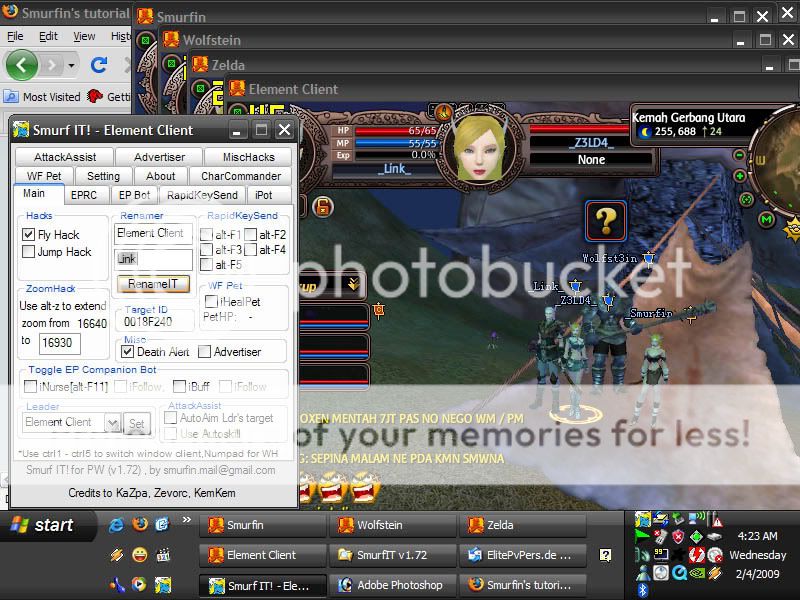
- Perfect World client cannot run twice if there is a pw client window named "Element Client" , so you have to rename it using a Renamer/Title Changer, in Smurf IT, you can use the Renamer feature, type any name you like, for example above I use 'Smurfin', click button [RenameIT], and it will be changed to 'Smurfin'.
- Repeat as necessary, your cpu is the limit, you can run as many as you want. In the next screen shot I managed to run four clients, and once [RenameIT] button is clicked, the Element Client will be changed to Link, and another client can be called.
That's all for how to use multiclient using renamer.
SETTING UP SMURF IT's EPRC & EP BOT FEATURE
-If you have an ELF PRIEST char and want to use the EPBOT/EPRC feature, now go to [EPRC] tab and input that inputbox for EP WINDOW NAME, it should also be one from your char window name slots you set earlier. As for mine it's named Zelda.
-after that, still at [EPRC] tab, check EP Remote Control Command group and adjust the keys there to those you use in your game to cast each of the skill there. (keep in mind for function key or keyboard key that consists of more than one letter like F2 or for example ENTER , in AutoIT you have to put {} so if using F2 you write it -> {F2} <- or else the script will read it as pressing key 'F' and then '2' , not F2 function key)
-after all set, goto [main] tab and choose a leader there and click [set]
you can now use EPRC feature!
-Now onto EPBOT feature, go to its tab, and tick any window name slots you want your EP to nurse/autoheal or auto give buff.

from the image above,it means EP will nurse Smurfin,Zelda/herself,Link and also Wolfstein if EP detects one of their hp bars is below 80%(you can change the tolerance from SmurfIT.ini)
-you can change the setting here for the healkey for iNurse (again you have to check if your ingame keys match with the keys here or else it won't work), for EP Buff, bind all buff skills into one combo key for example {F5}

now about the timer, there are 2 timers in there, one is in minutes and one is in seconds. The one in minutes is for how long before EP begin to give the next buff to your chars while the one in seconds is the buffing time needed for EP to cast one complete buffs cycle for regen/pdef/mdef/matk. This is necessary so if EP is in buffing state, she will not autoheal, to ensure your char get complete buff and not interrupted by autoheal. So for x seconds set in here your chars are not nursed because EP is in buffing state, we have iPot feature to fill in that gap. Also EP will not buff all chars straight, it has one minute delay before buffing the next char, the reason is so that EP can go back nursing for awhile and will not nursing for only x seconds in each minute untill all chars get complete buff.
-once all set, just go to [main] tab and tick iNurse and or iFollow & iBuff and or iFollow. iFollow means EP will auto follow leader after autoheal or giving buff. iNurse/iBuff should be working now!
-after that, still at [EPRC] tab, check EP Remote Control Command group and adjust the keys there to those you use in your game to cast each of the skill there. (keep in mind for function key or keyboard key that consists of more than one letter like F2 or for example ENTER , in AutoIT you have to put {} so if using F2 you write it -> {F2} <- or else the script will read it as pressing key 'F' and then '2' , not F2 function key)
-after all set, goto [main] tab and choose a leader there and click [set]
you can now use EPRC feature!
-Now onto EPBOT feature, go to its tab, and tick any window name slots you want your EP to nurse/autoheal or auto give buff.
from the image above,it means EP will nurse Smurfin,Zelda/herself,Link and also Wolfstein if EP detects one of their hp bars is below 80%(you can change the tolerance from SmurfIT.ini)
-you can change the setting here for the healkey for iNurse (again you have to check if your ingame keys match with the keys here or else it won't work), for EP Buff, bind all buff skills into one combo key for example {F5}
now about the timer, there are 2 timers in there, one is in minutes and one is in seconds. The one in minutes is for how long before EP begin to give the next buff to your chars while the one in seconds is the buffing time needed for EP to cast one complete buffs cycle for regen/pdef/mdef/matk. This is necessary so if EP is in buffing state, she will not autoheal, to ensure your char get complete buff and not interrupted by autoheal. So for x seconds set in here your chars are not nursed because EP is in buffing state, we have iPot feature to fill in that gap. Also EP will not buff all chars straight, it has one minute delay before buffing the next char, the reason is so that EP can go back nursing for awhile and will not nursing for only x seconds in each minute untill all chars get complete buff.
-once all set, just go to [main] tab and tick iNurse and or iFollow & iBuff and or iFollow. iFollow means EP will auto follow leader after autoheal or giving buff. iNurse/iBuff should be working now!
SilkRoad Online


 SilkRoad Online BOT
 http://mmoxploits.blogspot.com/2009/02/silkroad-bot.html
 SilkRoad Online Game Client Download
http://games.softpedia.com/progDownload/Silk-Road-Download-7978.html
Game Information
The SilkRoad on-line, which the European western fantasy, the Chinese eastern fantasy and the new Islam fantasy based upon the abundant cultures and legends of China, Islam and Europe.
The episode-pattern scenario is written in the background of mythologies and legends of a lot of countries including Xiyouji, Arabian Night's Entertainment and Greek mythology. The player often flies about with the magic carpet, see the Mediterranean evening sun or fight desperately with ghosts in crossing over Huang He River. On the basis of such a variety of scenarios, you can take pleasure in the inimitable quest each time with the feeling of seeing one-act play.
Beyond the general guild pattern community where familiar people come together, organizing the community with various objects is available. The organizations include the town community centering around the oasis, merchant group for the compensation trading, burglar guild that the burglar players are gathered and hunter guild to protect the justice. The confrontations among various communities elicit the exciting showdown composition.
Like the Chinese characters who use the flying walk to float on the water surface and move leaving an afterimage, the European characters to use the power of Greek gods like Zeus or Apollo and the Islam characters to freely control the power of lamp elves, the fresh and unique skill which cannot have been seen in the existing games get unfolded.
You need not enjoy weary battle any longer thanks to the speedy play reminding the spectators of action game through the chain attack system thrusting, chopping and swaying actions, the speeding character through the spirit gauge and incisive attack effect. Enjoy yourself over the exciting battle in the strain and thrill with the feeling like the action game.
The presentation of splendid world can be directly shown in this game, like the monster who come out in the swung grass, the burglars who come running with kicking up a dust, a blinding forest with a smoke, a dangerous donjon full of the machine equipment and the natural environment like total eclipse and lunar eclipse.
The delicate dramatics presented grass naturally swung or lapel waved by the direction of the wind in the consderation of the action of the player through the dynamic animation. As the character which the motion blending technique is applied to can express simultaneously more than 2 actions like shaking the hands on the walking, the realistic action can be made through the movement similar to those of human.
The SilkRoad adopts the broad world from China to Europe as a background. However, the waiting time for the loading is not generated in the middle of the general game play, in spite of move extensive map connecting the Silk Road or exploring the donjon. In addition, the SilkRoad provides respective users with the optimum manipulating environment through the bi-directional interface of mouse and keyboard, and various interface skin supports
Conquer Online II BOT
There are two versions in the download file
THE TWO VERSION MUST RUN ON PATCH 5067+
one is with controlclick and one is without controlclick
the difference is the controlclick one works but will send u to autoclick jail within 10mins
the without controlclick one does take over ur mouse, but will not send u to autoclick jail (well at least didnt when i tested for an hr)
updates include:
1. all clicks will be unique, meaning that they wont click at the same XY repeatly
2. check whether user is using vista, if yes, then tooltip will be disable
3. soundbeep will be default as off
4. check version and notify user if there exists newer version
PATCH 5067
CharName address for un-modify [Conquer2.0] clients: 0x57B604
Debug cases will be automatically ignored/rejected
unless provided a screenshot for me to debug.
(Read the solving problem section first, or Debug v1.2 program )
Instructions:
1. Open CO-1024x768
2. Make sure "show name"
3. Open ELSEpath and set your settings
4. Press OK in tab "File" when u are done
5. Input CharName for checking memory address
6. If correct, the program will ask u to set path points
7. After u set certain path points, press Cancel in order to start
8. Done!
Screenshot:

HowToFindCharNameAddress:
If u have wrong address, it means either it is using a outdated address, or u have a modify client. and u can do the following steps to get it work quickly
Method1.
1. Download the Debug (at the download section below this)
2. Open the program, and type in your character name while your client is login
3. Wait 20-30 seconds, and copy down the character address
4. Open ELSE
5. Go to ADV tab
6. In the CharName box, type in the new address that u found
7. Check the "Confirm edit" CheckBox
8. Go to File Tab, and press OK to save setting + start
Method2.
for advance people
1. Open cheatengine (Can be downloaded in Cheat Engine)
2. Hook CO client
3. In the SearchBar, type in your CharacterName
4. below it, change the ScanType to text
5. Press "First Scan" button
6. Copy down the first address in the result lists on the left column
7. Change the 00ABCDEF to 0xABCDEF

7. Open ELSE
8. Go to ADV tab
9. In the InputBox, type in the new address that u found
10. Check the "Confirm edit" CheckBox
11. Go to File Tab, and press OK to save setting + start
Debug:
use it for fun / if u cant run the program properly
well, this is a program exactly what it sounds like..Debug the possible errors that u have with ELSEpath
Debug is a program that check exactly all the requirements that ELSEpath needs
for example, first step, u need to input character name
then after few seconds of searching memory address
it will produce something like this:

Download
Debug v1.2
http://rapidshare.com/files/200179541/Debug_v1.2.zip.html
ELSEpath v1.7
http://rapidshare.com/files/200179799/ELSEpath_v1.7.zip.html
THE TWO VERSION MUST RUN ON PATCH 5067+
one is with controlclick and one is without controlclick
the difference is the controlclick one works but will send u to autoclick jail within 10mins
the without controlclick one does take over ur mouse, but will not send u to autoclick jail (well at least didnt when i tested for an hr)
updates include:
1. all clicks will be unique, meaning that they wont click at the same XY repeatly
2. check whether user is using vista, if yes, then tooltip will be disable
3. soundbeep will be default as off
4. check version and notify user if there exists newer version
PATCH 5067
CharName address for un-modify [Conquer2.0] clients: 0x57B604
Debug cases will be automatically ignored/rejected
unless provided a screenshot for me to debug.
(Read the solving problem section first, or Debug v1.2 program )
Instructions:
1. Open CO-1024x768
2. Make sure "show name"
3. Open ELSEpath and set your settings
4. Press OK in tab "File" when u are done
5. Input CharName for checking memory address
6. If correct, the program will ask u to set path points
7. After u set certain path points, press Cancel in order to start
8. Done!
Screenshot:
HowToFindCharNameAddress:
If u have wrong address, it means either it is using a outdated address, or u have a modify client. and u can do the following steps to get it work quickly
Method1.
1. Download the Debug (at the download section below this)
2. Open the program, and type in your character name while your client is login
3. Wait 20-30 seconds, and copy down the character address
4. Open ELSE
5. Go to ADV tab
6. In the CharName box, type in the new address that u found
7. Check the "Confirm edit" CheckBox
8. Go to File Tab, and press OK to save setting + start
Method2.
for advance people
1. Open cheatengine (Can be downloaded in Cheat Engine)
2. Hook CO client
3. In the SearchBar, type in your CharacterName
4. below it, change the ScanType to text
5. Press "First Scan" button
6. Copy down the first address in the result lists on the left column
7. Change the 00ABCDEF to 0xABCDEF

7. Open ELSE
8. Go to ADV tab
9. In the InputBox, type in the new address that u found
10. Check the "Confirm edit" CheckBox
11. Go to File Tab, and press OK to save setting + start
Debug:
use it for fun / if u cant run the program properly
well, this is a program exactly what it sounds like..Debug the possible errors that u have with ELSEpath
Debug is a program that check exactly all the requirements that ELSEpath needs
for example, first step, u need to input character name
then after few seconds of searching memory address
it will produce something like this:
DownloadDebug v1.2
http://rapidshare.com/files/200179541/Debug_v1.2.zip.html
ELSEpath v1.7
http://rapidshare.com/files/200179799/ELSEpath_v1.7.zip.html
Thursday, 19 February 2009
SilkRoad BOT
ISBot - International Silkroad Bot


Features : Download
http://rapidshare.com/files/128018690/ISBotv3b.rar.html
Note : If you dont have AutoSelect Skill. Open AutoSelect.exe and Press Install AutoSelect.
Home : Start Bot
End : Stop Bot
Features :
- Working when Sro Minimized
AutoSelect (Patch + Distance )+ Buffer + KeyHelper
Downloadhttp://rapidshare.com/files/128018690/ISBotv3b.rar.html
Note : If you dont have AutoSelect Skill. Open AutoSelect.exe and Press Install AutoSelect.
Home : Start Bot
End : Stop Bot
Subscribe to:
Posts (Atom)