Perfect World Hacks and BOT
Downloads
Smurf IT! http://rapidshare.com/files/200377746/SmurfIT_v1.72__reupload_.rar.htmlFeatures-Jumphack,
-Flyhack,
-Zoomhack,
-Multiclient using Renamer,
-KaZpa's Wallhack v1.92,
-RapidKeySend,
-EP Remote Control
-EP companion bot (with iNurse & iFollow & iBuff),
-iPot (a.k.a AutoPot),
-WF iHealPet (autoheal for pet),
-Char Commander.
-'AttackAssist'
-Advertiser Bot
-Culti Hack.
*Multiclient supports up to 5 window name slots by running the app only once for all of the above features


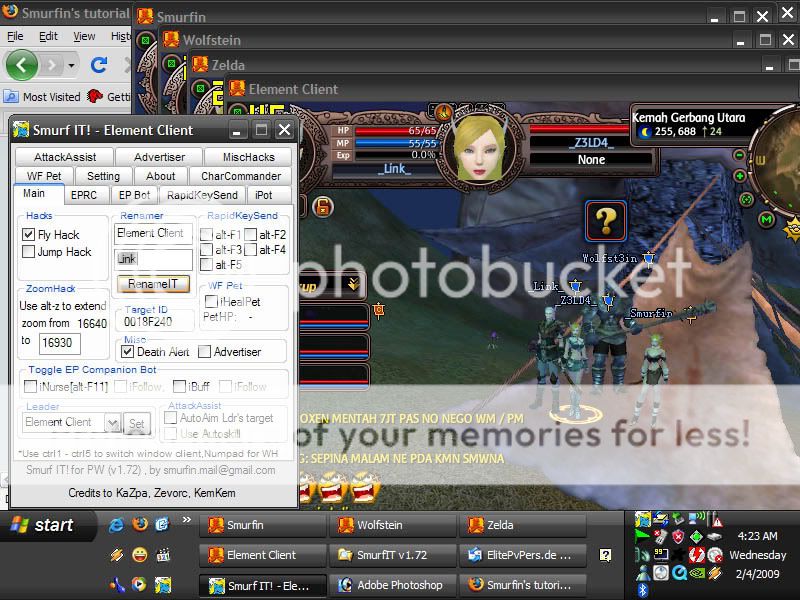
- Perfect World client cannot run twice if there is a pw client window named "Element Client" , so you have to rename it using a Renamer/Title Changer, in Smurf IT, you can use the Renamer feature, type any name you like, for example above I use 'Smurfin', click button [RenameIT], and it will be changed to 'Smurfin'.
- Repeat as necessary, your cpu is the limit, you can run as many as you want. In the next screen shot I managed to run four clients, and once [RenameIT] button is clicked, the Element Client will be changed to Link, and another client can be called.
That's all for how to use multiclient using renamer.
SETTING UP SMURF IT's EPRC & EP BOT FEATURE
-If you have an ELF PRIEST char and want to use the EPBOT/EPRC feature, now go to [EPRC] tab and input that inputbox for
EP WINDOW NAME, it should also be one from your char window name slots you set earlier. As for mine it's named Zelda.
-after that, still at [EPRC] tab, check EP Remote Control Command group and adjust the keys there to those you use in your game to cast each of the skill there. (keep in mind for function key or keyboard key that consists of more than one letter like F2 or for example ENTER , in AutoIT you have to put {} so if using F2 you write it -> {F2} <- or else the script will read it as pressing key 'F' and then '2' , not F2 function key)
-after all set, goto [main] tab and choose a leader there and click [set]
you can now use EPRC feature!
-Now onto EPBOT feature, go to its tab, and tick any window name slots you want your EP to nurse/autoheal or auto give buff.

from the image above,it means EP will nurse Smurfin,Zelda/herself,Link and also Wolfstein if EP detects one of their hp bars is below 80%(you can change the tolerance from SmurfIT.ini)
-you can change the setting here for the healkey for iNurse (again you have to check if your ingame keys match with the keys here or else it won't work), for EP Buff, bind all buff skills into one combo key for example {F5}

now about the timer, there are 2 timers in there, one is in minutes and one is in seconds. The one in minutes is for how long before EP begin to give the next buff to your chars while the one in seconds is the buffing time needed for EP to cast one complete buffs cycle for regen/pdef/mdef/matk. This is necessary so if EP is in buffing state, she will not autoheal, to ensure your char get complete buff and not interrupted by autoheal. So for x seconds set in here your chars are not nursed because EP is in buffing state, we have iPot feature to fill in that gap. Also EP will not buff all chars straight, it has one minute delay before buffing the next char, the reason is so that EP can go back nursing for awhile and will not nursing for only x seconds in each minute untill all chars get complete buff.
-once all set, just go to [main] tab and tick iNurse and or iFollow & iBuff and or iFollow. iFollow means EP will auto follow leader after autoheal or giving buff. iNurse/iBuff should be working now!


 Perfect World BOTS and Hacks *5 STAR*
 Perfect World Game Client Download